Courses & Projects by Rob Marano
Notes for Week 2
← back to syllabus ← back to notes
Topics
- Recap Computer Architecture and the Stored Program Concept
- Introducing the instructions of a computer delivered by the architecture
- Operations of the computer hardware
- Operands of the computer hardware
- Signed and unsigned numbers
- Representing instructions in the computer
- Logical operations
Topics Deep Dive
Recap: What is Computer Architecture?
Computer architects define the fundamental organization and behavior of a computer system, enabling both hardware implementation and software execution.
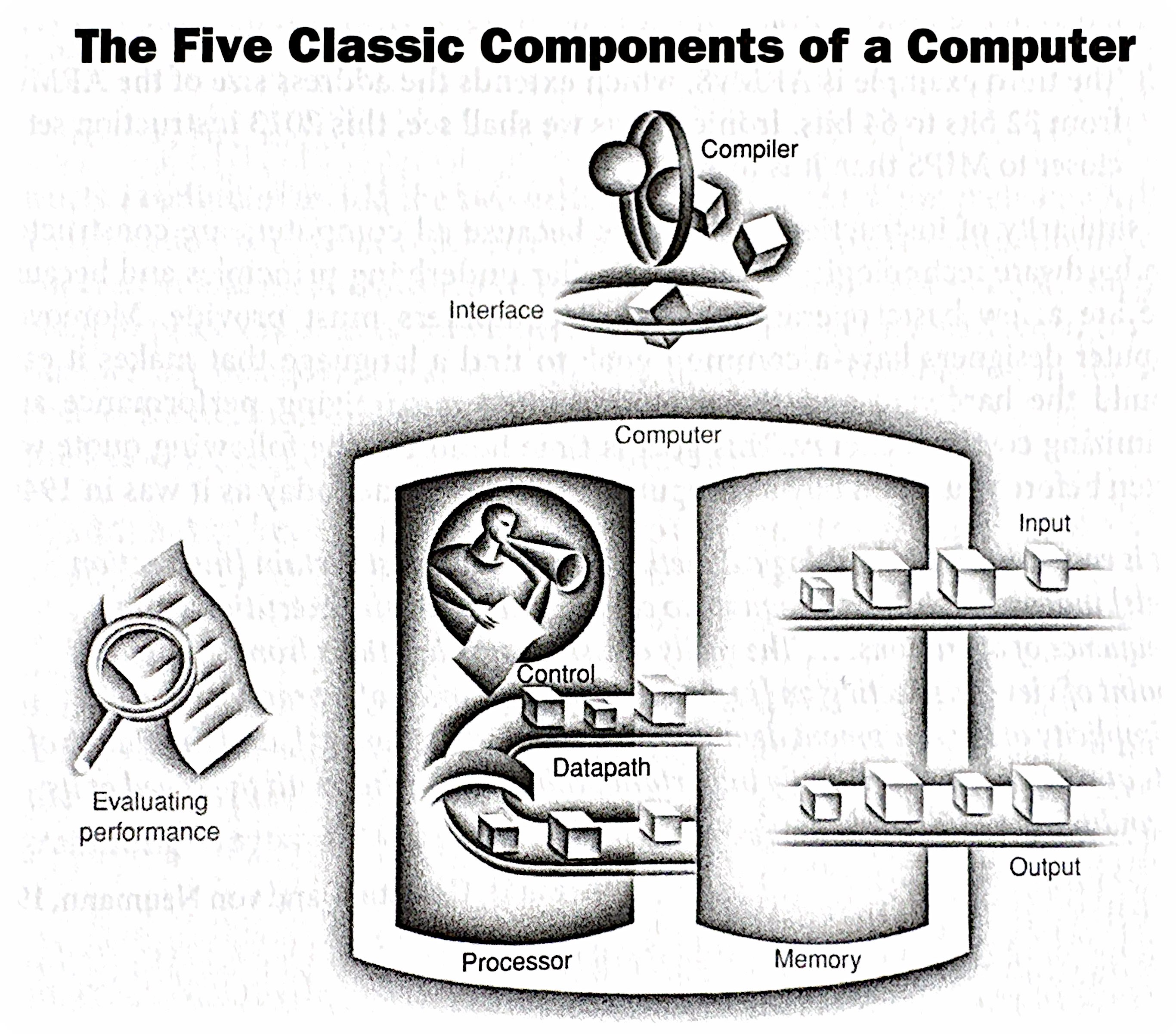
Recap:The Five Classic Components of a Computer
These five components are interconnected by data, address, and control buses, which are sets of wires that carry data and control signals.
Recap:The Stored Program Concept
The stored program concept is the idea of storing both the instructions (the program) and the data in the computer’s memory. This allows for:
- Flexibility: Changing programs becomes as simple as loading a new set of instructions into memory.
- Automation: The computer can fetch and execute instructions sequentially without human intervention.
- Efficiency: Data and instructions can be accessed and manipulated quickly from memory.
This concept is fundamental to how all modern computers operate.
Recap: von Neumann vs. Harvard Architectures
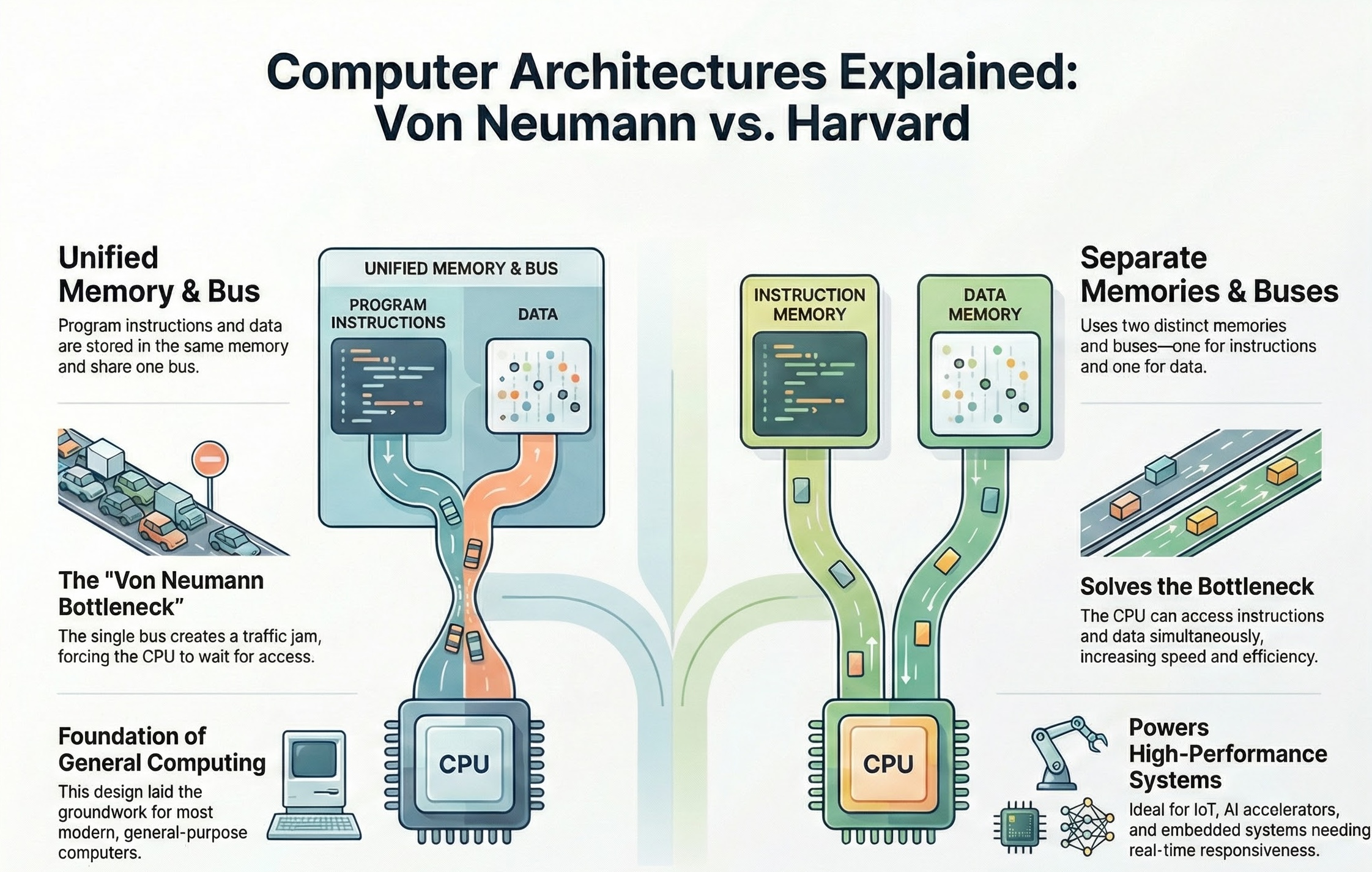
Remember, the von Neumann bottleneck arises because both instructions and data must travel over the same bus to and from memory. This can limit performance, especially when the CPU needs to fetch instructions and data frequently. The Harvard architecture mitigates this by allowing parallel access to instruction and data memories.
Recap: Performance of a Computer
Here’s a breakdown of key aspects of computer performance:
1. Execution Time: 2. Throughput: 3. Latency: 4. Resource Utilization: 5. Power Consumption: 6. Cost:
and don’t forget the Power Wall in computer architecture fabrication.
The “Power Wall” refers to the increasing difficulty and impracticality of continuing to increase processor clock speeds to achieve performance gains. For many years, increasing clock speed was the primary driver of improved CPU performance. However, this approach has run into fundamental physical limitations, leading to the “power wall.”
Instructions: The Language of the Computer (Instruction Set Architecture (ISA))
Today, we’ve laid the foundation for understanding the basic components and principles of computer architecture. Our next lecture will delve into the Instruction Set Architecture (ISA).
The ISA defines the set of instructions that a particular processor can understand and execute. It’s the interface between the hardware and the software. We’ll explore:
- Instruction formats: How instructions are encoded and represented in memory.
- Addressing modes: How the processor accesses data in memory.
- Instruction types: Arithmetic, logical, data transfer, control flow, etc.
- ISA design considerations: How ISA choices impact performance, complexity, and programmability.
Understanding the ISA is crucial for writing efficient code, optimizing compiler design, and designing new processors. It’s the bridge between the high-level world of programming and the low-level world of hardware.
Read Textbook Chapter 2 notes by professor
Introduction (Textbook §2.1)
- Instruction Set: The vocabulary of commands understood by a computer.
- Stored-Program Concept: The fundamental idea that instructions and data are both stored in memory as numbers. This allows computers to run different programs by simply loading new numbered instructions into memory.
Operations of the Computer Hardware (Textbook §2.2)
- Arithmetic: Every computer must perform arithmetic. MIPS provides operations like
addandsub. - Design Principle 1: Simplicity favors regularity. MIPS arithmetic instructions always have exactly three operands (e.g.,
add a, b, ccreatesa = b + c). This regularity simplifies the hardware implementation.
Every computer must be able to perform arithmetic. The MIPS instruction set includes:
add a, b, c# The sum of b and c is placed in a.sub a, b, c# The difference of b and c is placed in a.
The arithmetic instructions of the MIPS32 architecture are a cornerstone of understanding how CPUs actually do math. Remember, we’re building up from the ground floor, so understanding these fundamentals is crucial for your future work in computer architecture and embedded systems.
Here’s the high-level overview of MIPS32 arithmetic instructions, focusing on the key concepts relevant to you as budding engineers and computer scientists:
- Register-Based Operations: MIPS32 is a load-store architecture. This means arithmetic operations are performed only on data held in registers. You can’t directly manipulate values in memory with arithmetic instructions. This is a crucial design decision that impacts performance and instruction complexity. Think of registers as the CPU’s scratchpad – quick access, limited space.
- Three-Operand Instructions: Most MIPS32 arithmetic instructions are three-operand instructions. This means they take two source registers and one destination register. The general format is
operation $rd, $rs, $rt, where$rdis the destination,$rsis the first source, and$rtis the second source. For example,add $t0, $t1, $t2means$t0 = $t1 + $t2. This consistent format simplifies instruction decoding and execution. - Instruction Types and Functionality: MIPS32 provides a variety of arithmetic instructions, covering the basic operations:
- Addition:
add,addu(unsigned),addi(immediate),addiu(unsigned immediate).
Pay close attention to the signed vs. unsigned versions. Overflow handling is different! - Subtraction:
sub,subu(unsigned).
Again, mind the signed/unsigned distinction. - Multiplication:
mul,mult,multu.multandmultuproduce a 64-bit result, stored in the specialHIandLOregisters. You then usemfhiandmfloto move these parts into general-purpose registers.mulprovides the lower 32-bit result. - Division:
div,divu. Similar to multiplication,divanddivuproduce a quotient and a remainder. The quotient is stored inLO, and the remainder inHI. - Logical Operations:
and,or,xor,nor. These perform bitwise logical operations. Crucial for manipulating data at the bit level. We’ll delve into their uses later when we discuss control flow and data manipulation. - Shift Operations:
sll(shift left logical),srl(shift right logical),sra(shift right arithmetic). These are essential for bit manipulation and are often used in implementing multiplication and division by powers of 2.
- Addition:
- Immediate Operands: Many instructions have an “immediate” version (e.g.,
addi). This allows you to use a constant value directly in the instruction, without needing to load it into a register first. This is a significant optimization for frequently used constants. Preparation is handled by the assembler and encoded into the machine code of the program. - Overflow and Underflow: It’s your responsibility as the programmer to handle overflow and underflow conditions. MIPS32 provides some instructions that detect overflow (the signed versions), but it doesn’t automatically throw exceptions in all cases. Understanding the implications of signed and unsigned arithmetic is crucial to the success of your CPU design!
- No Condition Codes: Unlike some other architectures, MIPS32 does not use condition codes (flags) set by arithmetic operations. This has implications for how you implement branching and comparisons, which we’ll discuss when we cover control flow.
Exploration of Operands of the Computer Hardware (Textbook §2.3)
- Registers: Hardware primitives used for storing variables. MIPS has 32 32-bit registers. Groups of 32 bits are called a word.
- Design Principle 2: Smaller is faster. A smaller number of registers generally allows for faster clock cycles than a very large number of registers.
- Memory Operands: Since there are only a few registers, complex data structures (arrays, structs) are kept in memory.
- Data Transfer Instructions: Commands to move data between memory and registers.
lw(load word): Copied from memory to register.sw(store word): Copied from register to memory.
- Alignment: MIPS requires words to start at addresses that are multiples of 4.
- Constant/Immediate Operands: Frequently used constants are embedded directly into instructions (e.g.,
addi). - Design Principle 3: Make the common case fast. Handling constants immediately is faster than loading them from memory.
Signed and Unsigned Numbers (Textbook §2.4)
- Two’s Complement: The standard representation for signed integers in computers. Looking at the sign bit (MSB) determines if the number is positive (0) or negative (1).
- Negating a number: Invert all bits and add 1.
Representing Instructions in the Computer (Textbook §2.5)
Instructions are represented as binary numbers. MIPS uses a 32-bit fixed-length format.
- R-type (Register): Used for arithmetic (op, rs, rt, rd, shamt, funct).
- I-type (Immediate): Used for data transfer and immediates (op, rs, rt, constant/address).
- J-type (Jump): Used for jumps (op, address).
Logical Operations (Textbook §2.6)
- Operations to manipulate bits within valid words.
- Shift:
sll(shift left logical) andsrl(shift right logical) move bits, effectively multiplying or dividing by powers of 2. - Bitwise:
and,or,nor,xoroperate bit-by-bit, useful for masking and setting bits.